CSS3 provides powerful pseudo-classes that allow the designer to select multiple elements according to their positions in a document tree. Using these pseudo-classes can be a little confusing at first, but it becomes a lot easier over time to set up your layout.
In today’s article I’m going to take a look at 5 pseudo-classes that will simplify our design process and reduces a lot of time to create a certain visual effects. You will also find demonstration below each point to demonstrate how we can use these selectors in different design scenario you face everyday in your designing process.
1. The ‘nth-child’ Pseudo-selector
One of my favorite pseudo-selectors is the nth-child. This can be very useful if you are dealing with a Content Management System where you have no ability to change the server-side code to add classes into the markup.
This pseudo-class matches elements on the basis of their positions within a parent element’s list of child elements. The pseudo-class accepts an argument, N, which can be a keyword or a number. The argument N can also be given as an+b, where a and b are integers (for example, 3n+1). For example, if the argument is 3, the third element will be selected.
How to use the nth-child
If you put simply a number in the parentheses, it will only affect the element associated with that number. For example, here is how to select only the 3rd element:
ul li:nth-child(3) {
  background-color: #333;
}
Now let’s look at the table below for Pseudo-class Expressions, the first column of the table represents values for n, and the other columns display the results (for N) of various example expressions.
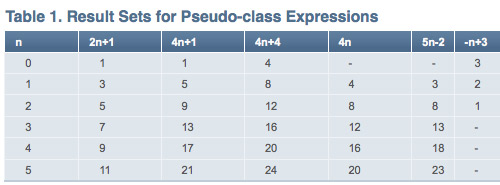
Thus the expression 2n+1 will match the first, third, fifth, seventh, ninth, and so on, elements if they exist. This can be used to create alternated <li> background color.
ul li:nth-child(2n+1) {
  background:#dfe6ec;
  color: #333;
}

Check out our demo.
Internet Explorer has no support at all for the
:nth-child pseudo-class. But if you are using jQuery, which supports all CSS selector including :nth-child, the selector will work, even in Internet Explorer.Further Resources on how to use the nth-child
- - Understanding :nth-child Pseudo-class Expressions
- - How nth-child Works
- - Cleaner Code with CSS3 Selectors
The :target pseudo-class
This pseudo-class affects an element that’s the target of a fragment identifier ( point to a specific element on a page, represented by a “#” and an anchor) in the document’s URL. When we click on a link that ends with a fragment identifier that element we are pointing to becomes the target (hence :target).
How to use the target
For example, if the URI was http://devsnippets.com/article/5-advanced-css-pseudo-class.html#nth, the following selector would match the element that had an id attribute of “nth”:
div > div:target {
background:#FFC1E4 none repeat scroll 0 0;
border:3px solid #EF4F7A;
padding:10px;
}

Check out our demo.
Internet Explorer has no support at all for the
:target pseudo-class. Opera doesn’t support this selector when using the back and forward buttons. Other than that, it has support from the other major browsers.Further Resources on how to use the target
- - The CSS3 :target Pseudo-class And CSS Animations
3. Use the :focus Pseudo Class
You can apply styling to your input areas and textareas that only takes affect when a user has clicked into that area using the :focus pseudo class. For example, you could change the background and border color on those elements like so:
textarea:focus, input:focus {
	background:#FFC1E4;
        border:3px solid #EF4F7A;
}
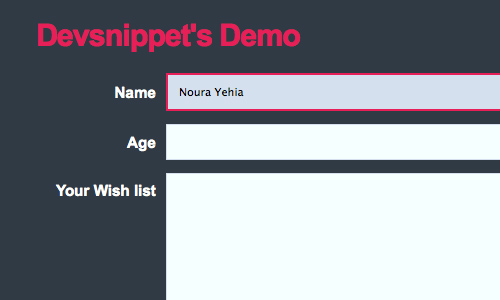
Check out this demo.
Most browsers support the
:focus Pseudo Class.4. The negation pseudo-class: :not()
The :not() pseudo-class is extremely useful when you want to apply a style to a class or group of elements, and want to exclude some element(s).
The code below selects all div elements that do not have .comment class.
div:not(.comment) {
border:1px solid #333
}
You can use a comma to choose more than one class. The code below selects all div elements that do not have .comment or .post classes.
div:not(.comment, .post) {
border:1px solid #333
}
The
:not() pseudo-class is only supported by modern browsers (Firefox, Safari and Opera), but not internet explorer.5. The only-of-type pseudo-class
The only-of-type pseudo-class matches an element that’s the only child element of its type.
This selector will match an img element that’s the only child img element of its parent element:
.post > img {
	float: left;
	}
.post > img:only-of-type {
	float: none;
	margin: 10px;
	}

Check out our demo.
The
only-of-type pseudo-class is only supported by modern browsers (Firefox, Safari and Opera), but not internet explorer.
Alex
Mar 08, 2025 @ 16:40:19
$20 bucks on CSS4 implementing a full-fledged scripting language, to facilitate interactive animations and whatnot. It’s just a matter of time.
When will we see the first “CSS exploit”?
Steven
Mar 08, 2025 @ 17:06:56
@Alex: Don’t have to wait for CSS4. Webkit already has built in CSS animations and all sorts of advanced selectors, none of which are part of the CSS spec.
Mar 08, 2025 @ 20:45:12
We have all that power now in SVG, and have had it for some years in most contemporary browsers.
DeepDown
Mar 09, 2025 @ 07:06:57
“We have all that power now in SVG”
Thanks Molly for pointing that out!
Mar 09, 2025 @ 00:13:38
thanks, really cool stuff
that last one was a bit hard to understand without an actual example tho.
JP DeVries
Mar 09, 2025 @ 01:49:59
Internet Explorer is so lame
Mar 12, 2025 @ 09:00:58
Agreed. IE8 came out and big surprise, it doesn’t support anything either. Great.
Essex Landscaper
Mar 18, 2025 @ 03:32:32
Checkout IE9 preview, has a lot more promise to it !
Dimitri Fengshui
Mar 09, 2025 @ 04:14:47
You can defines a CSS type selector to set the skin for all components of a given type.
Keith Clark
Mar 09, 2025 @ 05:23:06
If your happy to use a JavaScript solution, you can emulate most of these selectors in Internet Explorer 5.5 to 8 with ie-css3.js
http://www.keithclark.co.uk/labs/ie-css3/
Mar 09, 2025 @ 08:15:29
That is really help about little know pseudo classes.
You are now listed on FAQPAL
Mar 09, 2025 @ 08:35:08
5 Advanced CSS Pseudo Classes that will Save your Day…
In today’s article I’m going to take a look at 5 pseudo-classes that will simplify our design process and reduces a lot of time to create a certain visual effects….
CSS Brigit | 5 Advanced CSS Pseudo Classes that will Save your Day
Mar 09, 2025 @ 09:25:44
5 Advanced CSS Pseudo Classes that will Save your Day…
In todays article Im going to take a look at 5 pseudo-classes that will simplify our design process and reduces a lot of time to create a certain visual effects. You will also find demonstration below each point….
Mar 09, 2025 @ 11:02:27
helping techniques for web designers and developers.
Mar 09, 2025 @ 11:44:12
Nice and cool techniques !
thx
Mar 10, 2025 @ 06:34:22
Just check out http://www.w3.org/TR/css3-selectors/#selectors
5 Advanced CSS Pseudo Classes that will Save your Day | DevSnippets | CSS Guru How to CSS
Mar 11, 2025 @ 10:07:08
[...] this link: 5 Advanced CSS Pseudo Classes that will Save your Day | DevSnippets Share and [...]
Liam O'Leary
Mar 11, 2025 @ 10:13:54
Great article, I will be using these on some of our new websites, it’s gona make life a little easier, apart from MS Internet Explorer not supporting most of them, grrrr Microsoft you loosers, get it sorted in IE9!
Tidy Design
Mar 11, 2025 @ 10:27:49
Very tidy!! Love to read/learn more about css… It is just so cooool
WallMountedHDD
Mar 11, 2025 @ 17:11:30
Figures this is CSS3. All this CSS3/HTML5 stuff is such a huge tease. I’m learning it, but I’m not using any of it yet. It’ll be a while…
Mar 11, 2025 @ 18:53:31
Love it! Thanks for the pseudo class article mate
InfamousLA
Mar 11, 2025 @ 20:06:53
@Alex I got $20 on it too - as it is CSS3 is becoming more intricate with all these advanced selectors. What happened to it’s purpose of taking care of deprecated presentational tags in HTML? Isn’t that one of the reasons you have Javascript , and what not.
Great article though.
Mar 11, 2025 @ 21:10:49
Cool… Nice Stuff…
2025-03-12 유용한 링크 | We are connected
Mar 15, 2025 @ 01:54:14
[...] 5 Advanced CSS Pseudo Classes that will Save your Day [...]
Linkhub - Woche 10-2010 « pehbehbeh
Mar 15, 2025 @ 02:14:33
[...] 5 Advanced CSS Pseudo Classes that will Save your Day [...]
5 Advanced CSS Pseudo Classes that will Save your Day | DevSnippets | [codepotato]
Mar 16, 2025 @ 01:53:17
[...] 5 Advanced CSS Pseudo Classes that will Save your Day | DevSnippets Posted March 16th, 2010 in Blog by Gareth http://devsnippets.com/article/5-advanced-css-pseudo-class.html [...]
dropjack.com
Mar 16, 2025 @ 08:50:25
5 Advanced CSS Pseudo Classes that will Save your Day | DevSnippets…
CSS3 provides powerful pseudo-classes that allow the designer to select multiple elements according to their positions in a document tree. Using these…
5 Advanced CSS Pseudo Classes | adkarta.com
Mar 21, 2025 @ 06:28:24
[...] with a different design scenarios, you can use these selectors will find a description. Source : http://devsnippets.com/article/5-advanced-css-pseudo-class.html Share and [...]
Ivan
Mar 31, 2025 @ 07:46:05
when using negation I’m not sure you’re allowed to use commas to exclude more than one element.
The correct way to do it:
div:not(.comment):not(.post) {
css
}
Best Of Web And Design In March 2010 | Creative Nerds
Mar 31, 2025 @ 13:59:42
[...] 5 Advanced CSS Pseudo Classes that will Save your Day [...]
Best Of Web And Design In March 2010 - Programming Blog
Apr 02, 2025 @ 07:58:19
[...] 5 Advanced CSS Pseudo Classes that will Save your Day [...]
Adobe Photoshop How To | Best Of Web And Design In March 2010
Apr 15, 2025 @ 05:01:22
[...] 5 Advanced CSS Pseudo Classes that will Save your Day [...]
[Linkdump #2] CSS3 na koniec tygodnia. « Tomasz Kowalczyk
Apr 26, 2025 @ 11:29:12
[...] CSS, które oszczędzą Twój czas pracy. Myślę, że nie potrzeba dalszych wyjaśnień. ;] | Artykuł [...]
12 Elegant, Free & High Quality HTML5+CSS3 Templates | DevSnippets
Apr 27, 2025 @ 05:54:36
[...] - 5 Advanced CSS Pseudo Classes that will Save your Day [...]