by Noura Yehia
WordPress is becoming so powerful that you can use it to do whatever comes in your mind. User love it for its flexibility, you have plugins to enhance its power and you can hack your theme code to add unique functionality.
In this article, we’ll show you 10 new powerful WordPress hacks, tricks and plug-ins with a good explanation, so you understand how it works and modify it to your needs.
1. Post Image Feature (the_post_thumbnail)
the_post_thumbnail is one of my favorite additions to WordPress 2.9, a new thumbnail feature for themes where you will be able to easily upload a post thumbnail. Justin Tadlock wrote an interesting tutorial explaining various things you need to know about WordPress 2.9’s post image feature.

To add support for the post image feature in a theme, You only need one line of code to turn this feature in your theme. Add this to your theme’s functions.php file:
add_theme_support( 'post-thumbnails' );
After that, you’ll need to call the image somewhere within The Loop in your template files. You’d do this by adding this line of code:
<?php the_post_thumbnail( 'medium' ); ?>
The previous code calls for medium-sized images in your template files. Fore more information about this feature, make sure you check Justin Tadlock’s tutorial and Michael Preuss guide.
2. WordPress Threaded Comments
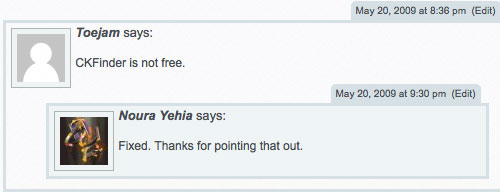
One of the big enhancements of the WordPress Comment’s features is the threaded comment functionality. Many bloggers search for themes has this built-in functionality. However, won’t it be easier if we just use a plugin. Below you will find an amazing WordPress plugin that will just add this feature without the need to edit any code of your theme files.
WordPress Thread Comment:
This Plugin is an enhancement for WordPress’s comment function. It enables users to reply on a exist comment, and the discussion will be displayed threaded or nested.
3. Contactable – Contact Form Easy with WordPress
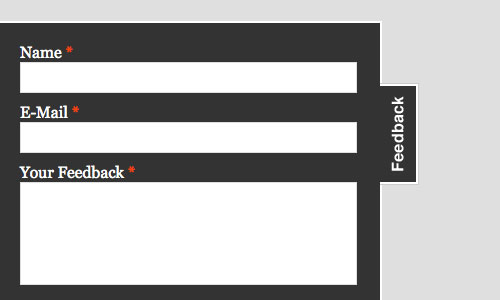
Frank Bültge shows how easy and resource friendly it is to integrate a jQuery contact form in WordPress.
He used for the example the great form Plugin Contactable for jQuery by Philip Beel. This Plugin is designed to make contact/feedback forms simpler and more accessible.
4. Exclude A Category From Turn Off Comments Automatically
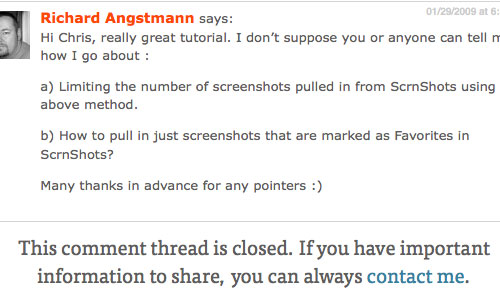
If you would like to automatically turn off comments on everything after a certain period, all you have to do is go to your discussion settings, and set to automatically turn off comments on everything after x days. However, on certain things, you want the comments to be left on forever in a certain category. All you have to do is follow the hack we found in this post, just copy the code below into your functions.php and change the $cat values.
/**
 * Close comments on an old post.  Hooked to comments_open and pings_open.
 * small modifications on the default functions of WordPress
 *
 * @param bool $open Comments open or closed
 * @param int $post_id Post ID
 * @param int $cat Category ID (cat_ID), set '' or empty for all categories
 * @param int $days_old Days to close comments, set '' for use value from settings
 * @return bool $open
 */
function wpe_close_comments_for_old_post( $open, $post_id, $cat = array(1, 4), $days_old = '' ) {
	if ( !$open )
		return $open;
	if ( in_category($cat) )
		return $open;
	if ( '' === $days_old )
		$days_old = (int) get_option('close_comments_days_old');
	if ( !$days_old )
		return $open;
	$post = get_post($post_id);
	if ( time() - strtotime( $post->post_date_gmt ) > ( $days_old * 24 * 60 * 60 ) )
		return false;
	return $open;
}
add_filter( 'comments_open', 'wpe_close_comments_for_old_post', 10, 2 );
add_filter( 'pings_open',    'wpe_close_comments_for_old_post', 10, 2 );
Source : Exclude A Category From Turn Off Comments Automatically
5. How to disable HTML in WordPress comments
By default, WordPress allows certain tags in comments. Therefore commenters can add links, style text in bold and italics, add tables, and more. This can cause a lot of headache to you from spammers who can easily fill in your blog with comments linking to their websites. Fortunately there is a quick fix to this issue, whatever the commenter types will be displayed literally. No “certain tags are allowed” or “do this to code samples”. What this plugin does is it converts single quotes, double quotes, the less than symbol (<), the greater than symbol (>), and ampersands (&) to HTML entities whenever a comment is posted, so that they are displayed as-is when someone views the comment.
6. Create a Free Email Newsletter Service using WordPress
In this tutorial, we will learn the manual way to create a simple Email Newsletter Service for your WordPress blog by using WordPress and Feedburner with a few plugins to. You can track the performance of your newsletter by checking how many subscribers you have, how many clicks each link gets and much more.

Source : Create a Free Email Newsletter Service using WordPress
7. Alternate Post Styling On Your Home Page
While i was designing the current theme of Noupe.com, i wanted to display the first four posts bigger than the rest, with images and extended text, with the remaining posts shown more simply. Fortunately, Jean-Baptiste Jung sent me a smart solution where he created a custom loop that displays the first four posts different than the rest.
<?php
$postnum = 0;
while (have_posts()) : the_post(); ?>
<?php if ($postnum <= 4){ ?>
<div <?php post_class() ?> id="post-<?php the_ID(); ?>">
  <div class="date"><span><?php the_time('M j') ?></span></div>
    <h2>(<?php echo $postnum;?>)<a href="<?php the_permalink() ?>"><?php the_title(); ?></a></h2>
	<div class="post-image" style="text-align:center;">
		<a href="<?php the_permalink() ?>"><img src="<?php bloginfo('template_directory' ); ?>/timthumb.php?src=<?php  echo catch_that_image(); ?>&w=500&h=200&zc=1" alt="<?php the_title(); ?>" /></a>
	</div>
	<p><?php the_content('Read the rest of this entry »'); ?></p>
	<p class="more"><a href="#">Read More</a></p>
  </div>
</div>
<?php } else {
<div <?php post_class( 'single ' . $end ); ?> id="post-<?php the_ID(); ?>">
	<div class="post-content">
		<h3><a href="<?php the_permalink() ?>">(<?php echo $postnum; ?>)<?php the_title(); ?></a> <?php edit_post_link('_', '', ''); ?></h3>
		<p><?php the_excerpt( '' ); ?></p>
		<p class="more"><a href="#">Read More ?</a></p>
	</div>
</div><!-- End post -->
<?php }
	endwhile;
	?>
What he did was creating a PHP variable, named $postnum, which is invoked at the end of the loop. If $postnum is less than or equal to 4, the post is displayed in full. Otherwise, it is displayed in its more compact form.

Source : Alternate Post Styling On Your Home Page
8. Easy Retweet Button
John Resig created a simple script for tracking the number of people visiting a blog post from Twitter, in a completely unobtrusive manner. The script itself is completely standalone (no dependencies) and can be included in any page relatively painlessly. Additionally, since it’s just HTML, CSS, and JavaScript, it’s completely themeable and customizable to the style of your site.
To use it in your WordPress blog, you will just need to use the line of code below placed in your single.php theme file:
<a href="<?php the_permalink() ?>" class="retweet"><?php the_title(); ?></a>

9. Protect WordPress Against Malicious URL Requests
Many WordPress sites gets attacked with extremely malicious code, fortunately Jeff Starr wrote a simple script that
checks for excessively long request strings (i.e., greater than 255 characters), as well as the presence of either “eval(” or “base64” in the request URI.
How to use it:
To protect your site using this lightweight script, save the code as a plugin and activate in the WordPress Admin area. Once active, this plugin will silently and effectively close any connections for these sorts of injection-type attacks.
<?php
/*
Plugin Name: Block Bad Queries
Plugin URI: http://perishablepress.com/press/2009/12/22/protect-wordpress-against-malicious-url-requests/
Description: Protect WordPress Against Malicious URL Requests
Author URI: http://perishablepress.com/
Author: Perishable Press
Version: 1.0
*/
global $user_ID; if($user_ID) {
	if(!current_user_can('level_10')) {
		if (strlen($_SERVER['REQUEST_URI']) > 255 ||
			strpos($_SERVER['REQUEST_URI'], "eval(") ||
			strpos($_SERVER['REQUEST_URI'], "CONCAT") ||
			strpos($_SERVER['REQUEST_URI'], "UNION SELECT") ||
			strpos($_SERVER['REQUEST_URI'], "base64")) {
				@header("HTTP/1.1 414 Request-URI Too Long");
				@header("Status: 414 Request-URI Too Long");
				@header("Connection: Close");
				@exit;
		}
	}
} ?>
Source : Protect WordPress Against Malicious URL Requests
10. Curating Comments Threads: Feature Comments
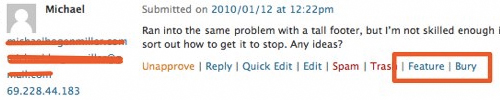
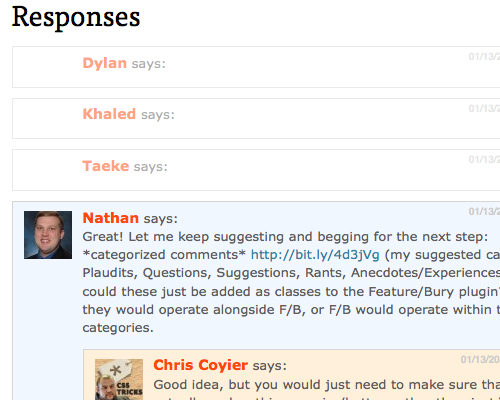
Chris Coyier thought of a smart idea for a plugin. Two more buttons for comment moderation:feature and bury, handy to highlight comments that add value to your post. Utkarsh Kukreti created Feature/Bury Comments plugin for WordPress. This plugin lets the admin add “featured” or “buried” css class to selected comments.
<li id="comment-67793" class="comment even thread-even depth-1 buried">
</li>
<li id="comment-67794" class="comment odd alt thread-odd thread-alt depth-1 parent featured">
Literally all it does is giving you class names to work with. A simple Hook that you then use to apply unique styling to target with JavaScript to appropriately “feature” or “bury” them as you find necessary for your site.
designfloat.com
Jan 18, 2025 @ 04:53:30
10 NEW WordPress Wanted Hacks and Powerful Techniques » DevSnippets…
In this article, we’ll show you 10 new powerful WordPress hacks, tricks and plug-ins with a good explanation, so you understand how it works and modify it to your needs….
Datzerox
Jan 18, 2025 @ 05:00:47
Wooo, very usefull. Thanks!
Jan 18, 2025 @ 06:23:24
“Protect WordPress Against Malicious URL Requests” is it safe to use!
How do i know it is not causing problem to real visitors? Thanks
Jan 19, 2025 @ 06:02:51
This code shouldn’t affect your visitors, this plugin will silently and effectively close any connections for any sort of injection-type attacks.
ikram
Jan 19, 2025 @ 21:40:33
thanks for the explanation. I have same question as satya, I just use it on my WP without knowing how it work
Chon
Jan 18, 2025 @ 07:29:40
I have been looking for a good comment thread for a while… this one is perfect. Thanks!
web design kent
Jan 22, 2025 @ 04:51:04
Very useful article, many thanks!
Jim Hanifen
Jan 18, 2025 @ 09:31:14
Nice post, the new WordPress has so much more functionality, thanks for highlighting many of these new features.
Begin with an idea
Jan 18, 2025 @ 10:03:59
Nice round up. Been a while since I saw a few interesting WP tweeks and plugins that actually help and that are new and not a full reposts from hundreds of other sites
@satya this code is for sql injections.it’s got nothing to do with how your site will be displayed. That was a problem for 2.8.4 and it’s still a possible situation for alot of people…
You are now listed on FAQPAL
Jan 18, 2025 @ 11:41:12
10 NEW WordPress Wanted Hacks and Powerful Techniques…
In this article, we’ll show you 10 new powerful WordPress hacks, tricks and plug-ins with a good explanation, so you understand how it works and modify it to your needs….
san
Jan 18, 2025 @ 11:57:36
I was looking for newsletter plugin for the longest time than I gave up, thanks for the link!
Jan 18, 2025 @ 14:19:00
I love the retweet button! Thanks for the headsup on this!
Jan 18, 2025 @ 14:47:36
This is a wonderful list! One which has inspired many ideas! Awesome, thanks so much!
Ashley
Jan 18, 2025 @ 16:52:25
I’m just getting started in this whole WordPress theme stuff. So this is great!
Jonath Lee
Jan 18, 2025 @ 17:24:02
Great list of updated WPHacks. WP is getting greater.
abcphp.com
Jan 18, 2025 @ 17:53:14
10 NEW WordPress Wanted Hacks and Powerful Techniques » DevSnippets…
WordPress is becoming so powerful that you can use it to do whatever comes in your mind. User love it for its flexibility, you have plugins to enhance its power and you can hack your plugins code to add unique functionality….
Jan 19, 2025 @ 05:17:34
these are very very useful plugins. thanks a ton dude.
pligg.com
Jan 19, 2025 @ 06:18:18
10 NEW WordPress Wanted Hacks and Powerful Techniques » DevSnippets…
WordPress is becoming so powerful that you can use it to do whatever comes in your mind. User love it for its flexibility, you have plugins to enhance its power and you can hack your theme code to add unique functionality. In this article, we’ll show y…
Jan 19, 2025 @ 08:06:47
A great list to help those starting out with WordPress.
goofydg1
Jan 19, 2025 @ 11:40:39
nice resource.
Jan 19, 2025 @ 17:46:39
A great round up of some very useful and powerful WordPress techniques.
One of the other great features new to WordPress 2.9 that isn’t included in the post is the addition of the wp.me shortlinks.
I’ve just written a blog post explaining how to use them in your site if anyone is interested.
Anonymous
Jan 20, 2025 @ 03:26:40
10 NEW WordPress Wanted Hacks and Powerful Techniques » DevSnippets…
10 NEW WordPress Wanted Hacks and Powerful Techniques » DevSnippets…
Carol Logan Newbill
Jan 20, 2025 @ 08:50:23
#9, Block Bad Queries, is built into WP 2.9. Don’t add this hack if your WP is up to date — it breaks 2.9 and 2.9.1.
Jan 20, 2025 @ 11:35:58
Thanks for all the useful tips! I really liked the free newsletter tip!
Jan 20, 2025 @ 12:54:42
Thanks for these. I have been trying to figure out how to create custom loops for some time and, not being a PHP wizard, was coming up short.
CSS Brigit | 10 NEW WordPress Wanted Hacks and Powerful Techniques
Jan 22, 2025 @ 07:19:22
10 NEW WordPress Wanted Hacks and Powerful Techniques…
In this article, we'll show you 10 new powerful WordPress hacks, tricks and plug-ins with a good explanation, so you understand how it works and modify it to your needs….
Luis Rivera Colon
Jan 24, 2025 @ 13:39:01
The WordPress Threaded Comments its very usefull, and i use that same hack a lot in my projects.
pligg.com
Jan 30, 2025 @ 13:14:42
10 NEW WordPress Wanted Hacks and Powerful Techniques…
WordPress is becoming so powerful that you can use it to do whatever comes in your mind. User love it for its flexibility, you have plugins to enhance its power and you can hack your theme code to add unique functionality. In this article, we’ll show y…
Apr 22, 2025 @ 07:29:55
Thankful for the awesome hacks and codes.
Contactable: Un atractivo plugin jQuery para formularios de contacto » --MasComentados.com--
Jul 24, 2025 @ 06:18:19
[...] es un sencillo plugin (jQuery + PHP) desarrollado por Philip Beel (vía devSnippets) que permite habilitar formularios de contacto o feedback en cualquier página, al estilo [...]